MACHINE PROTECTION

Deny-by-default

OVERLAPPING IP MANAGEMENT

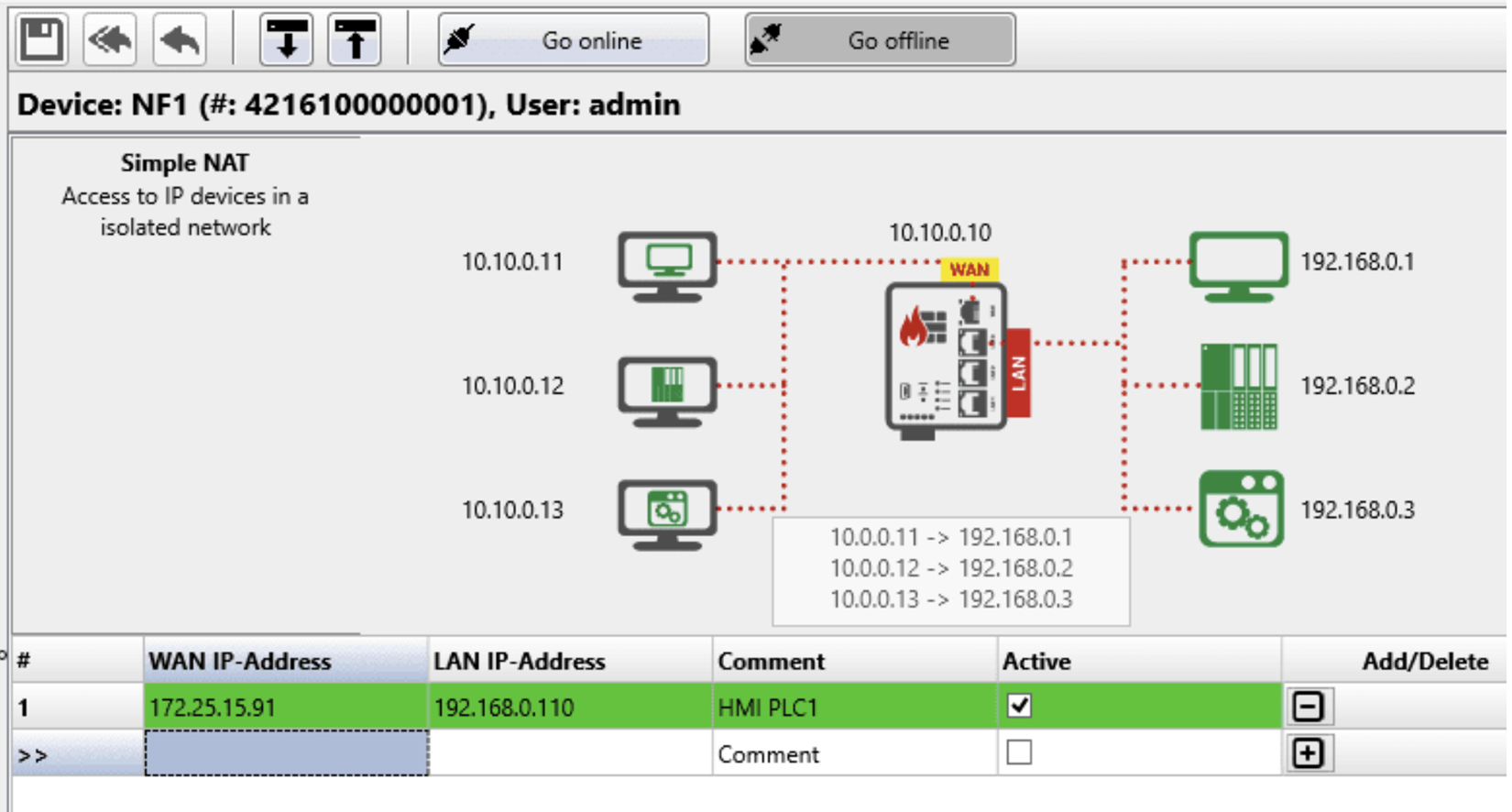
Network Address Translation

SIMPLE CONFIGURATION

Auto-Learning Capabilities

INDUSTRIAL PACKAGE

For inside electrical cabinets

THE PROBLEM

Your production network is only as secure as its weakest point

Legacy equipment, flat network architectures and ever more connectivity leave critical systems exposed, and regulation now expects segmentation rather than treating it as good practice. The obstacle is rarely the principle. It is that conventional firewalls are too large, too costly and too specialised to put in front of every machine, so the boundary ends up at the plant edge instead of where the risk actually sits.
Screenshot 2026-08-27 at 15.21.15
ANYBUS DEFENDER COMPACT

Turn every machine into a secure network zone

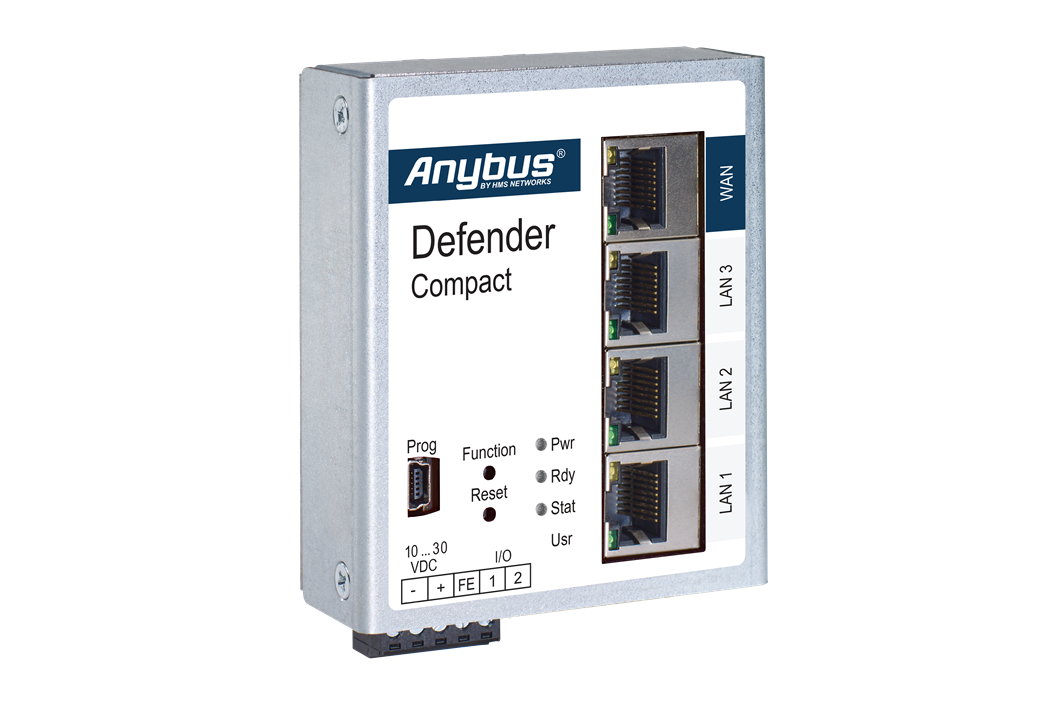
Anybus Defender Compact is a highly compact industrial firewall that divides your OT network into secure, manageable zones. It runs in both Bridge and NAT modes, so it suits a retrofit into existing systems as readily as a new installation. Regulations including NIS2 and IEC 62443 now expect this kind of segmentation, and the Defender Compact delivers it without the space, cost or complexity of a full-size appliance.

WHY ANYBUS DEFENDER COMPACT

Designed for real production environments

Designed for automation teams

The project-based configuration workflow is modelled on familiar PLC programming tools, helping automation engineers work with devices, connections, and rules in a recognizable environment.

Fits existing and new network designs

Use transparent segmentation where existing device addresses should remain unchanged, or isolate machine networks and resolve overlapping address ranges when integrating standardized equipment.

Learn before enforcing

Learning Mode observes existing network communication and helps teams turn required connections into an appropriate firewall policy. This reduces the need to start with a blank rule set and improves confidence before restrictions are applied.

Built for controlled deployment

Encrypted, password-protected, device-linked project configurations help keep changes controlled and reduce the risk of configurations being reused on unintended devices.

Compact enough to protect close to the machine

The space-saving design supports deployment inside control cabinets, allowing segmentation boundaries to be placed around individual machines and production cells.

Legacy protection

Protect older equipment and obsolete components without changing addresses or reworking topology

USE CASES

Solve real OT network challenges

Use Case 01
USE CASE 01

Prevent address conflicts

The solution

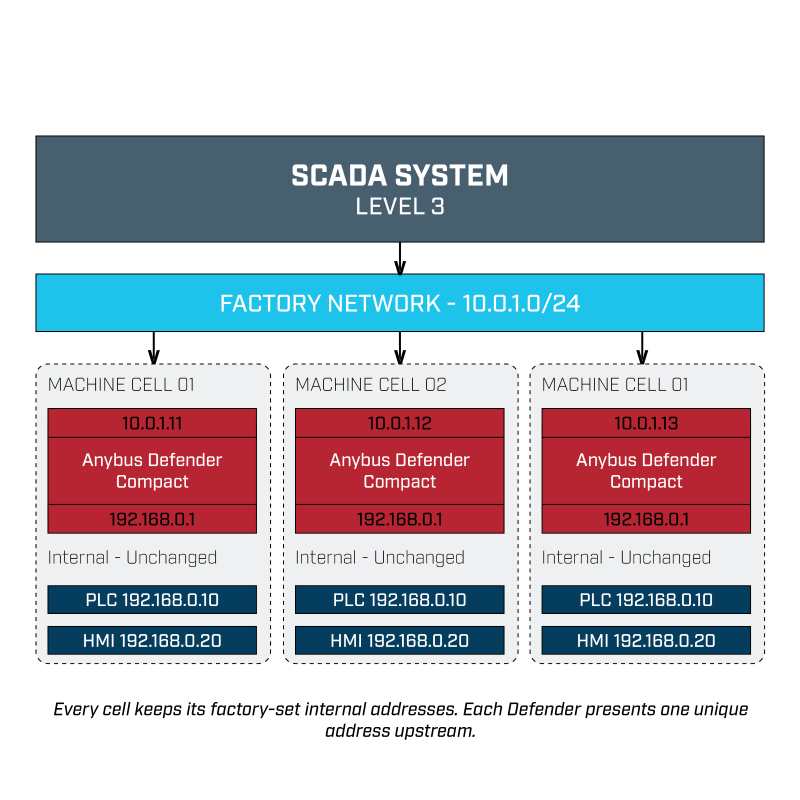
A line includes several machines built to the same design, so they share internal PLC and HMI addresses. Connect them all directly to the wider OT network and addresses collide, leaving supervisory systems unable to tell one machine from another.

What you can do

Deploy an Anybus Defender Compact at each cell and present the required internal devices to the factory network on unique addresses. Field device configuration stays exactly as originally commissioned, while SCADA and other authorised systems reach each machine through its assigned address.

The outcome
  • Faster commissioning: Repeated machine designs go on the network without reprogramming every PLC and HMI.
  • Preserved validation: Established internal machine configurations stay intact.
  • Controlled access:Only the devices and services the factory network needs are exposed.
Use case 02
USE CASE 02

Protect legacy equipment

The situation

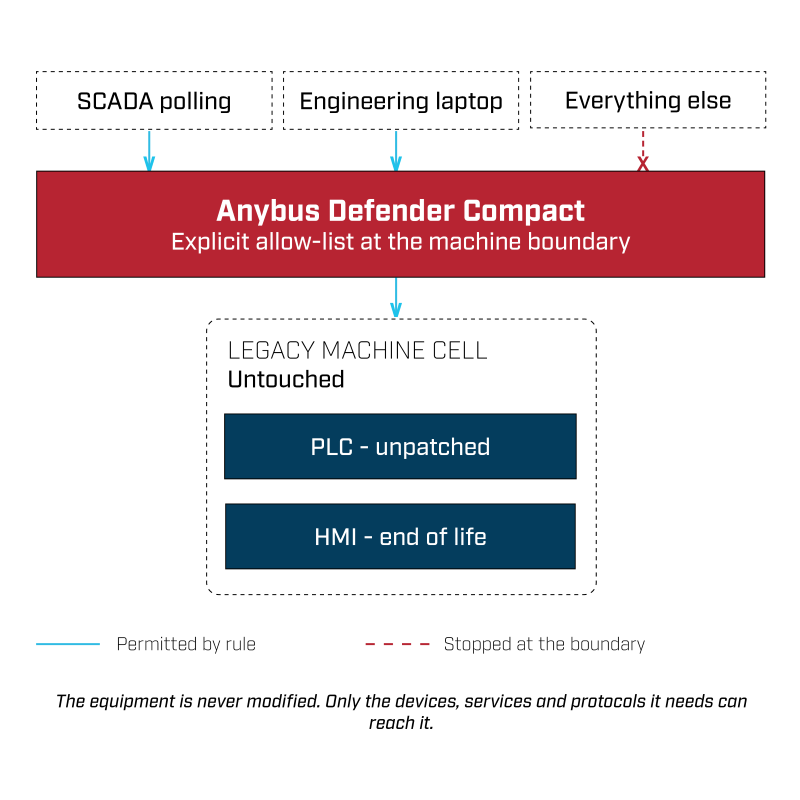
Older PLCs, HMIs and CNC systems often stay critical to production long after firmware and operating system support ends. On a flat network they are reachable from far more systems than operation requires.

What you can do

Place an Anybus Defender Compact in front of the machine or cell and restrict inbound and outbound traffic to the specific devices, services and protocols the equipment needs. The equipment itself needs no changes.

The outcome
  • Reduced exposure: The attack surface shrinks to the connections operation actually depends on.
  • Extended asset life: Essential equipment stays in service while replacement is planned properly.
  • A documented control: A compensating measure you can point to in a risk assessment or an audit.
Use case 03
USE CASE 03

Isolate production lines

The situation

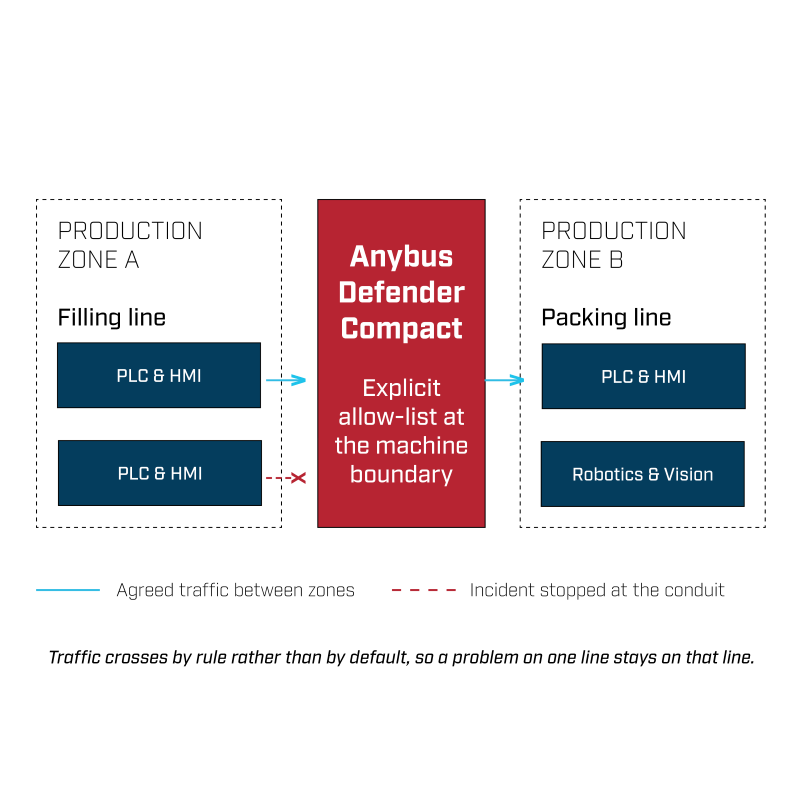
When machines and lines share a flat network, a misconfiguration, an unauthorised connection or a cyber incident travels sideways with very little to stop it.

What you can do

Create zones around machines or production areas and define which communication is permitted between them. Where changing device addresses is not an option, Defender Compact can sit transparently in the existing network.

The outcome
  • Limited lateral movement: Traffic between zones is allowed by rule rather than by default.
  • Contained incidents: A problem on one line stays on that line.
  • A route to zones and conduits: Segmentation you can build on rather than retrofit later.
NAT or Bridge mode

The Anybus Defender Compact works two ways

NAT mode

Use NAT mode when machines share identical internal IP addresses, or when a machine network needs to sit on the wider OT network without being redesigned. The Defender maps the required internal devices to unique addresses upstream, so overlapping ranges stop being a problem and duplicate machine builds connect without changes to the PLCs behind them.

Bridge mode

Use Bridge mode when you need to divide a flat network into secure zones without touching addressing. The Defender sits transparently between zones, applying your rules to the traffic passing through while leaving existing IP settings exactly as they are.

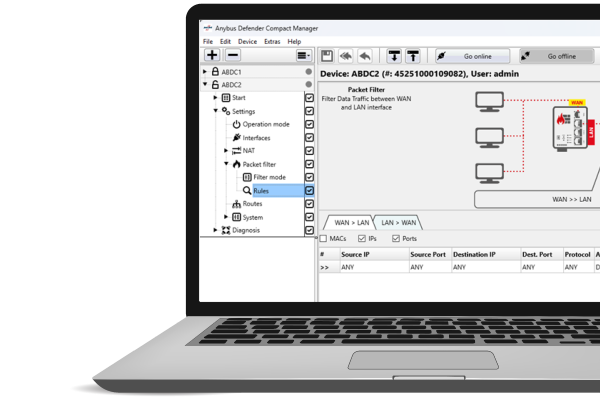
Anybus defender compact manager - laptop - right
Anybus Defender Compact Manager

See the traffic before you restrict it

Configuration runs through Anybus Defender Compact Manager, a project-based workflow that mirrors the programming tools automation engineers already use. Create and manage projects, work online or offline, and reuse the same setup across similar installations rather than rebuilding it each time.


Learning Mode does the difficult part first. It observes live traffic and records which devices actually communicate, turns that into a proposed rule set for you to review against what the process genuinely needs, and only then applies the policy. You start from evidence rather than an empty rule set.

Anybus Defender Compact technical specifications


Ethernet ports

4 x 10/100 Mbps (1xWAN, 3xLAN)

Network functions

Transparent bridge, routing, static routes, 1:1 NAT, SimpleNAT, Port forwarding

Traffic Filtering

MAC address, IP address, Port and Protocol

Power

10-30 VDC; 250 mA nominal

Mechanical

DIN-rail mounting; 92.6 x 69 x 38.5 mm; 235g

Operating environment

-40°C to 75°C, IP30
CertificationCE, UL (E214107)
 

Download Datasheet


COMPLIANCE

Supports compliance and regulations

IEC 62443

Zones and conduits is the model set out in IEC 62443-3-2, and network segmentation appears as a system requirement under restricted data flow in IEC 62443-3-3. Defender Compact provides the controlled communication paths between zones that both parts call for.

NIS2

Segmentation supports the risk management measures required under Article 21 of NIS2, particularly around network security and handling vulnerabilities in systems that cannot be patched.

NIST Framework

Segmentation supports the Protect function, and the visibility that Learning Mode produces contributes to Detect.

Additional resources

Do you want to find out more?

Technical Datasheet

Detailed specifications, deployment information, and technical guidance

Anybus Defender Compact Manager Brochure

Explore the configuration interface before deployment

Frequently asked questions

No. Learning Mode does the heavy lifting by watching your traffic and suggesting rules, and the Manager works much like PLC programming rather than enterprise IT tooling. If you can configure a PLC, you can configure this.
Use NAT when machines have overlapping or identical IP addresses and you need them on the same network without re-addressing. Use Bridge when you're segmenting a flat network into zones and want to keep existing IPs as they are.
It listens to live network traffic, identifies your devices and the communication between them, and turns that into suggested rules. You approve what's legitimate and deny the rest, which gives you a working policy far faster than writing one by hand.
Yes. The Manager handles configurations across several devices and lets you reuse them across similar installations, so rolling out to multiple lines or sites doesn't mean starting over each time.

Talk to an expert

Fill in your details and one of our OT security experts will be in touch to talk through your network and where the Anybus Defender Compact fits.